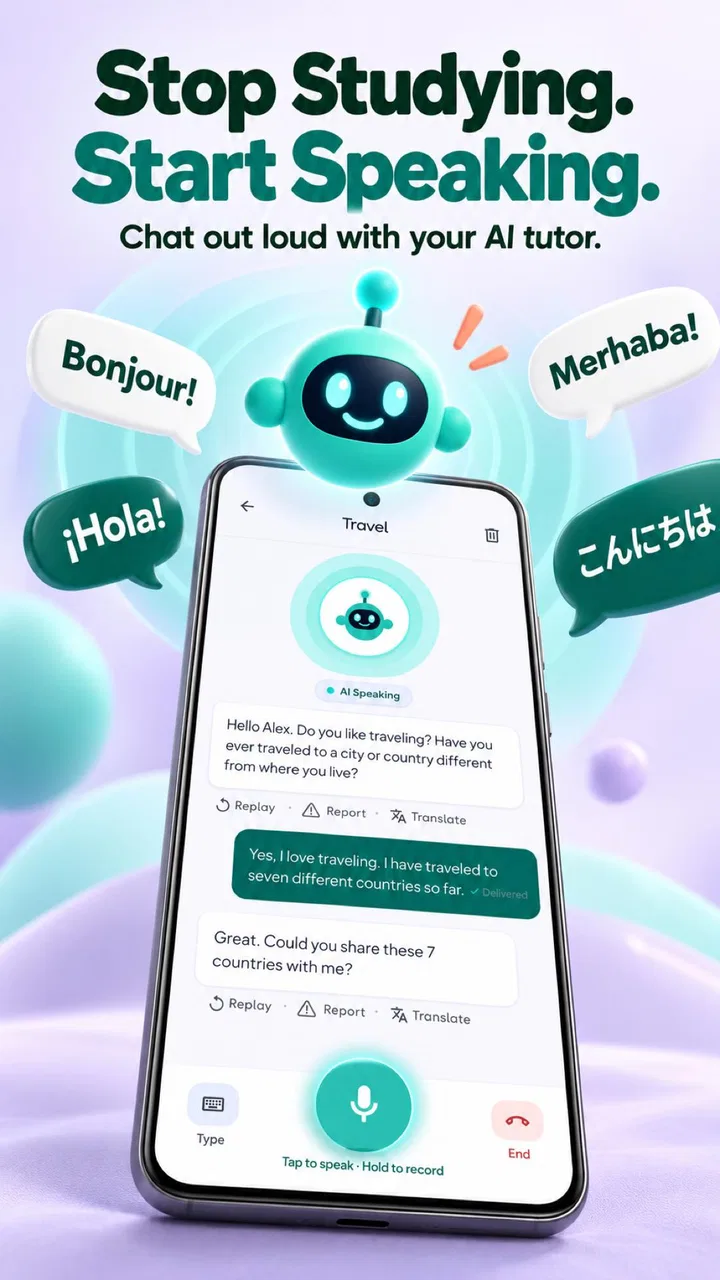
Learn Language by Chatting
- 4.3
- Rating
- 500.00K
- Installs
- Free
- Price

 Analysis by App-foxy
I tested Learn Language by Chatting as an education app built around AI conversation, and my first impression was that it aims at a very practical problem: knowing vocabulary is one thing, but producing a sentence quickly is another. Instead of treating language study as a sequence of isolated exercises, it gives you a chat-based place to practise speaking fluently, choose conversation topics, and use translation when you get stuck. That makes it especially interesting for people who understand more than they can comfortably say.
The app is developed by Kafadengi Bilisim and is available free of charge, although some individual in-app purchases range from around five to thirty dollars. It is rated for Teen users, works on devices running Android 6.0 or later, and its current version is 2.5. Those details matter in a household because a free download is not automatically a completely cost-free learning experience, and a shared phone or tablet can make it easy for different people to assume they are using the same learning space.
How Learn Language by Chatting fits into a shared household
I find a shared household works best when everyone treats Learn Language by Chatting as a turn-based practice space, rather than expecting one conversation to serve the whole family. Before handing over the device, I’d agree on who is practising, what they want to try, and whether they are using translation as a backup or leaning on it throughout. That small routine makes it easier to keep each session purposeful and leads naturally to the question of what the app is actually good at.
You May Also Like

 Blood Strike: 2.5 Anniversary
Blood Strike’s Loadouts Turn Every Drop Into a Tactical Gamble
A close look at Blood Strike’s custom loadouts: how fast access to signature weapons reshapes its battle royale rhythm, rewards preparation, and narrows the gap between fights.

 Pandora - Music & Podcasts
Pandora’s Music Is Easy to Start, but Harder to Recover
Pandora’s strength is its low-effort path from a seed to a station. Its weak spot is how much confidence it asks you to place in connection, setup, and quiet recovery.

 8 Ball Pool
 Is Built on Rivalries, Rematches, and Routine
A close look at the rivalries, rematches, shared routines, and unanswered safety questions that turn a quick pool match into a persistent mobile community.

 Samsung Music
’s Quiet Strength Is Playing What You Already Own
Its reach comes less from spectacle than from dependable access to a personal library. That simplicity is both the app’s strongest retention engine and its ceiling.

 AccuWeather: Weather Radar
AccuWeather Review: A Quick, Clear Forecast for Everyday Decisions
For everyday plans, the best forecast is the one you can understand quickly. AccuWeather makes rain timing, radar, and local conditions easy to act on, with a few trade-offs.

 Hill Climb Racing
Why Hill Climb Racing Still Turns Crashes Into One More Run
A tiny car, a bumpy hill and one more upgrade: Hill Climb Racing keeps resurfacing because its simple chaos makes every near-miss feel personal.
More From Our News Desk



A realistic evening use case
Imagine a teenager using a family tablet after dinner to practise English before an oral assignment. A parent may want to use the same device later for travel phrases, while another household member may simply be curious about having a short conversation with the AI. This is where the app’s conversational design feels more useful than a conventional flashcard session. Each person can approach it with a different goal: rehearsal for school, confidence before a trip, or a low-pressure way to turn passive vocabulary into active sentences.
In my experience, the strongest household use is not everyone chatting at the same time. It is short, separate sessions with a clear purpose. One user can choose a topic and try to keep the exchange moving, then another person can use the app later without needing a teacher to prepare material. The topic-based approach gives a shared device a little structure, even when the users have completely different levels.
There is also a useful social advantage. A learner who feels embarrassed making mistakes in front of relatives may be more willing to practise with an AI conversation partner. That does not replace real speaking with a teacher, classmate, or native speaker, but it lowers the emotional cost of starting. For a household where people have different schedules, this can be more realistic than arranging a regular practice time together.
What the app is actually good at
The central strength is immediate language production. You do not have to wait until you have completed a long lesson before trying to form an answer. I found the chat format most helpful when I deliberately treated it as a rehearsal space: I picked a familiar situation, answered in the target language, noticed where I hesitated, and used translation only when the missing word blocked the conversation.
That last point is important. Translation is convenient, but using it after every sentence can turn the exercise into reading rather than speaking. My better workflow was to attempt an answer first, simplify the sentence if necessary, and only then check the translation. This creates a useful trade-off: the app feels easier when you rely heavily on translation, but the practice becomes more valuable when you allow yourself a little uncertainty.
The conversation topics also make the experience less rigid than memorising a fixed list. A learner can focus on situations that are likely to matter personally, such as introductions, everyday plans, shopping, travel, or school-related conversation. I would not call this a complete language course, because the chat format does not automatically give the systematic progression that a textbook or structured classroom syllabus provides. Its value is concentrated in practice, not in covering every part of language education.
Three practical ways to get more from it
Use one topic as a speaking drill rather than a casual chat. Before beginning, choose a small target such as asking follow-up questions, describing yesterday, or giving an opinion. This prevents the conversation from becoming a string of very short replies and makes it easier to notice improvement.
Keep a personal “stuck list” outside the chat. Whenever I needed translation or had to rewrite a sentence, I would note the idea I was trying to express rather than copying a long block of text. Returning to those ideas later gives the next session a clear purpose and exposes the difference between recognising a phrase and producing it.
Use the same topic at two difficulty levels. First, answer with simple sentences so the exchange keeps moving. Later, revisit the topic and add reasons, comparisons, or details. This is a more useful progression than trying to sound advanced immediately, because fluency depends on maintaining the conversation when the perfect word is unavailable.
These workflows are not flashy features, but they change how the app performs as a learning tool. A person who opens it without a goal may enjoy the novelty of chatting and still make little progress. Someone who uses the AI to rehearse a specific communicative task is more likely to notice where vocabulary, grammar, or confidence is holding them back.
Setting boundaries on a shared device
Before letting several people use the app on one phone or tablet, I would agree on simple household rules. Each person should know whether the device is being used for private practice, casual exploration, or a paid feature. The app is free to download, but the presence of paid items means a child or teenager should not assume that every option is included without charge.
I would also avoid treating one visible chat history as a family progress record. A shared device can blur who wrote what, especially when users have different ages or language levels. If the app presents a conversation that another person has left open, the next user may continue it accidentally or misunderstand its context. A quick habit of closing the session and returning the device to its normal home screen is sensible, particularly when the tablet is used for schoolwork as well as entertainment.
For adults coordinating practice, the simplest approach is verbal rather than technical: decide whose turn it is, which language is being practised, and whether the goal is conversation or translation support. I would not promise parents a dedicated family-management system here. The useful boundary is the one the household creates around the device, the account, and any purchase decisions.
Account expectations and coordination
A real question for shared-device users is whether one installation should serve everyone. My advice is to think of the app as an individual practice space unless the people using it are comfortable sharing the same context. Different learners may want different topics, different levels of support, and different degrees of translation. Mixing those habits can make the experience feel inconsistent.
If several people use the same device, coordinate before starting rather than relying on the next person to understand what happened in the previous session. A parent helping a younger learner can ask them to explain the topic they chose and the phrases they found difficult. That turns a private AI exchange into a useful conversation about learning without pretending that the app itself is supervising the process.
This arrangement is also helpful when one person is paying attention to in-app purchases. The household should decide who is allowed to initiate a purchase and whether the app is being used only within its free availability. Since the listed purchase range is broad, I would not hand the device to a child with unrestricted payment access simply because the initial download costs nothing.
Age, trust, and the Teen rating
The Teen content rating should shape how families introduce the app. I would consider it more appropriate for teenagers and adults who can understand that an AI conversation is a practice tool, not a human tutor or a trusted friend. A younger child may need an adult nearby, not because the app should be treated as inherently alarming, but because language practice can involve open-ended conversation and translation choices that deserve context.
Trust also means explaining what the learner should and should not share during a chat. I would keep practice focused on invented situations or ordinary language goals rather than entering private family details, school records, addresses, passwords, or personal contact information. This is a good rule for any conversational service, and it is especially important on a device used by several people.
Parents should also set realistic expectations about accuracy. Translation can help a learner get unstuck, but it should not be treated as an unquestionable authority on tone, cultural nuance, or every grammatical choice. If a phrase matters for an exam, formal message, job application, or sensitive conversation, I would verify it with a teacher or a reliable reference. Learn Language by Chatting is strongest as a practice partner, not as the final editor for important communication.
Who will appreciate it most
I would recommend this app to an intermediate learner who already knows basic words and grammar but freezes when it is time to respond. It is also a good fit for a busy adult who wants short practice sessions without carrying a textbook through the day. Someone preparing for a trip may benefit from choosing practical topics and rehearsing several ways to express the same need.
It can work for a motivated beginner too, provided that person is willing to keep sentences simple and use translation carefully. The app does not remove the need to learn foundational vocabulary, pronunciation, or grammar. Instead, it gives those pieces somewhere to be used. A learner who expects the AI to teach everything from the alphabet onward may find the experience less complete than a structured course.
It is less suitable for someone who wants detailed teacher correction, a formal curriculum, or measurable exam preparation. A classroom, tutor, or dedicated course may be better when the learner needs a planned sequence and expert feedback on recurring mistakes. I would also skip it as the main tool if the user dislikes typing or chatting, because the central interaction is built around conversation rather than passive listening or simple multiple-choice review.
How it compares with familiar alternatives
Compared with flashcard apps, Learn Language by Chatting is better at forcing you to assemble an answer. Flashcards are excellent for repeated recall, especially when you are building a basic word bank, but they do not always prepare you for the moment when another person expects a complete reply. The AI chat fills that gap by making the learner choose words in context.
Compared with a traditional course, it is more flexible but less obviously systematic. A course normally tells you what to study next and may explain grammar in a deliberate order. Here, the learner has more control over topics and pace, but that freedom can become unfocused. I would pair it with a structured resource instead of asking it to replace one.
Compared with speaking to a human tutor, the app is easier to use spontaneously and less intimidating for repeated mistakes. A tutor remains better at understanding intent, correcting subtle errors, adapting explanations, and judging whether a phrase sounds natural in a particular social setting. The sensible choice depends on the goal: use the app for frequent low-pressure rehearsal, and use a person when accuracy, nuance, or accountability matters most.
Performance, cost, and everyday friction
The free entry point makes experimentation easy. You can try the conversational approach before deciding whether it belongs in a regular routine. Still, I would look at the payment screen carefully whenever an optional feature appears. A household should not confuse “free” with “no purchase decisions,” particularly when several people share one device.
The app’s modest minimum operating-system requirement also means it can suit some older Android hardware, which is useful for a family tablet that is no longer used as a primary phone. On the other hand, an older device may make any chat-based experience feel less comfortable if typing is slow or the screen is cramped. In that situation, the limitation may be the hardware rather than the learning design.
The public response is encouraging without being a substitute for personal testing: Learn Language by Chatting holds an average rating of 4.3 from around five hundred ratings and has passed half a million installs. I read those figures as evidence that the concept appeals to a meaningful audience, not as proof that every learner will enjoy it. The two published reviews are too small a written sample to tell me much about long-term study habits, so I would judge it by whether the chat format keeps you practising after the first few sessions.
My household verdict
After using it, I see Learn Language by Chatting as a focused conversation-practice app rather than an all-in-one language school. Its best quality is the way it turns a vague intention—“I should practise speaking”—into an immediate exchange with a topic and translation available when needed. For a teenager preparing for a speaking task, an adult rehearsing travel language, or a family sharing a spare tablet under clear boundaries, that is genuinely useful.
The household version of the recommendation comes with conditions. Keep users aware of the Teen rating, do not treat one shared chat space as a private account for everyone, and agree in advance about optional purchases. Encourage learners to attempt answers before translating, and review important language with a human or trusted reference. Those small habits protect the learning value and prevent the app from becoming a shortcut that feels productive without building independent speaking ability.
My final recommendation is to use it as a regular speaking workout, not as your entire language plan. If you want a friendly place to practise forming replies and you can organise your own goals, it is worth trying at no initial cost. If you need a complete syllabus, detailed correction, or strong family administration, choose a structured course or human teacher instead, and let this app handle the part many learners avoid: actually starting the conversation.
FAQs for Learn Language by Chatting
01What is Learn Language by Chatting and how does it work?
Learn Language by Chatting is an innovative app designed to help users learn new languages through real-time chat interactions. It connects you with native speakers for immersive language practice. By engaging in conversations, you gain practical experience and improve your linguistic skills in a natural and enjoyable way.
02Can I learn multiple languages simultaneously with this app?
Yes, Learn Language by Chatting supports multiple languages. You can choose to learn more than one language at a time. The app allows you to switch between languages easily, providing flexibility and a personalized learning experience tailored to your preferences and goals.
03Is there a cost associated with using Learn Language by Chatting?
The app offers a free version with basic features, but there are also premium options available. Upgrading to a premium plan unlocks additional features such as advanced lessons, unlimited chats, and ad-free experience. The subscription details and pricing can be found in the app store listings.
04How does the app ensure the safety and privacy of its users?
Learn Language by Chatting prioritizes user safety and privacy. It includes robust privacy settings, allowing you to control who can contact you. Personal information is protected and not shared without consent. The app also features reporting and blocking tools to handle any inappropriate behavior.
05What devices and operating systems are compatible with the app?
Learn Language by Chatting is available for both Android and iOS devices. It supports various versions of these operating systems, ensuring compatibility with a wide range of smartphones and tablets. Regular updates are provided to maintain functionality and introduce new features across platforms.
Pros
- Interactive and engaging chat format.
- Wide variety of languages offered.
- Adapts to user's learning pace.
- Includes native speaker interactions.
- User-friendly interface.
Cons
- Limited offline functionality.
- Requires internet for full features.
- Occasional translation inaccuracies.
- Ads can be intrusive in free version.
- Some features are premium only.

Learn Language by Chatting
Gallery